guide
How to Clean iPhone Charging Port Safely
6 min read
Your iPhone cable used to click firmly into place. Now it feels loose, charging cuts in and out, or only works when the cable is held at an awkward.
Your iPhone cable used to click firmly into place. Now it feels loose, charging cuts in and out, or only works when the cable is held at an awkward angle. Before assuming the battery or charger has failed, learn how to clean iPhone charging port safely. In many cases, the culprit is compacted pocket lint hiding at the very back of the port.
That said, a charging problem is not always dirt. Forcing tools into a delicate Lightning or USB-C port can turn a simple clean into an expensive repair. The smart approach is careful, controlled and honest about when to stop.
Why an iPhone charging port gets blocked
Your phone spends a lot of time in pockets, handbags, beach bags, cars and on café tables. Every time the charging cable goes in, it can push fibres, dust and grit deeper into the port. On the Costa del Sol, fine sand can make the problem worse, particularly after a day at the beach or travelling with your phone.
Over time, this debris forms a dense layer at the bottom of the port. The connector may look clean from the outside, yet it cannot reach the contacts properly. That is why a cable may appear connected but refuse to charge, disconnect during a call, or stop charging as soon as the phone is moved.
A blocked port usually causes a loose connection. If the cable still clicks in firmly but charging is unreliable, the issue could instead be a damaged cable, a failing plug, moisture, software behaviour or wear inside the charging port itself.
What you need before cleaning the port
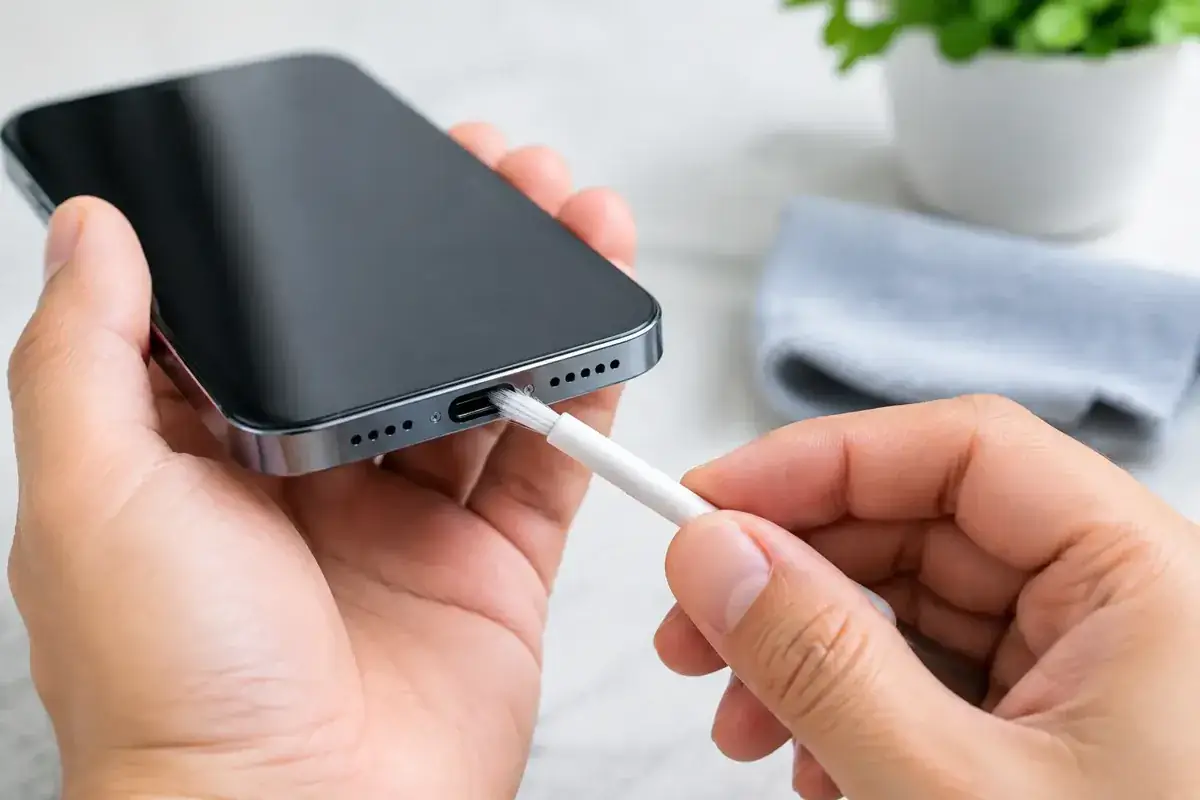
Keep the tools simple. The safest home option is a dry wooden toothpick or a non-metal, anti-static plastic pick designed for electronics. You also need good lighting, ideally a torch, and a clean, stable table.
Avoid improvised metal tools. Paperclips, sewing needles, pins, tweezers and SIM ejector tools can scratch or bend the internal contacts. Even if the phone charges afterwards, a slightly damaged contact can create an intermittent fault that gets progressively worse.
At iBrokeIt, contact the Fuengirola home workshop for an assessment and wait for appointment confirmation before travelling. Repair suitability, parts and timing are confirmed individually.
Before you start, remove any charging cable and switch the iPhone off. This reduces the risk of a short circuit and stops the screen from distracting you while you work.
How to clean iPhone charging port step by step
1. Check the cable and charger first
Test with a known-good Apple or certified cable and a reliable power adapter. Look closely at the cable end for dirt, bent metal or obvious wear. If another cable works perfectly, the port is not your problem.
It is also worth trying a different wall socket. This takes less than a minute and prevents you from poking around inside the phone when the fault is actually external.
2. Inspect the port in bright light
Hold the iPhone with the port facing you and shine a torch across the opening. Do not push anything in yet. You may spot a grey, brown or black layer of lint at the far end, or grains of sand around the edges.
Lightning ports are narrow and symmetrical. USB-C ports are wider but contain a central tongue that must not be bent. In either type, work around the sides and base with a very light touch. Never jab directly at the centre.
3. Loosen debris gently
Use the wooden toothpick or plastic pick to tease lint away from the back of the port. Keep the tool as flat as possible and use tiny movements. The aim is to lift debris out, not compact it further down.
Work one side at a time, then turn the phone upside down and lightly tap it against your open palm. Do not shake it violently or bang it on a table. If a large clump comes free, remove it carefully and inspect the port again.
You should not need force. Resistance can mean you are catching an internal component rather than dirt. Stop immediately if that happens.
4. Recheck, then test the connection
Once the visible debris is gone, look inside the port again. Reconnect the cable gently. A healthy connection should insert fully and feel secure, with no need to bend, twist or hold the cable in position.
Turn the iPhone back on and allow it to charge for several minutes. Check whether the charging symbol stays on when you move the phone slightly. If it does, you have likely solved a simple blockage.
When cleaning is not the right fix
Home cleaning has limits. Stop and arrange a professional diagnostic if the port is wet, corroded, visibly damaged, smells burnt, gets hot while charging, or has a broken pin or central USB-C tongue. Do not connect a charger if you suspect moisture inside the port.
You should also stop if the phone only charges at a precise angle after cleaning. This often points to worn internal contacts or a damaged flex assembly, rather than leftover lint. Repeatedly forcing the cable can damage both the cable and the iPhone further.
A charging issue can also be caused by battery health, a faulty charging accessory, charging-management software or previous liquid damage. Wireless charging can be a useful test on compatible models: if wireless charging works but wired charging does not, the port or cable becomes more likely. It is still not a complete diagnosis on its own.
Common mistakes that damage charging ports
The biggest mistake is treating the port like a hole that needs scraping. It is a precision component, and the contacts are designed to meet the connector exactly. Aggressive cleaning can leave permanent damage that lint never would.
Avoid these four shortcuts:
- Using needles, pins, paperclips or metal tweezers.
- Spraying liquids, cleaning chemicals or lubricant into the port.
- Blasting the port with high-pressure compressed air.
- Charging immediately after the phone has been exposed to water or sea spray.
Saltwater deserves particular caution. Even if the phone looks dry, salt residue can corrode contacts. Switch it off where possible, do not repeatedly plug a charger in to test it, and get it assessed quickly. Waiting can turn a recoverable issue into board-level damage.
Keep the port cleaner for longer
The easiest prevention is simple: keep the phone out of dusty pockets where possible and avoid placing it directly in sand. A case with a port cover can help for beach days, construction work or frequent outdoor use, although it is not essential for everyone.
Give your charging cable some attention too. A dirty connector can transfer debris back into a freshly cleaned port. Wipe the outside of the cable end with a dry, lint-free cloth and replace cables with damaged housings or loose connectors.
Do not leave the cable plugged in under tension. Charging while the phone is wedged against a sofa, pulled from a bedside table or used heavily with a tightly bent cable puts unnecessary strain on the port. A small change in how you charge can prevent a much bigger repair later.
Get the right answer if charging still fails
If you have cleaned the port carefully and charging is still unreliable, guessing is the slow and costly option. A proper inspection can establish whether you need a replacement cable, battery service, charging port repair or treatment for corrosion before parts are changed.
At iBrokeIt, contact the Fuengirola home workshop for an assessment and wait for appointment confirmation before travelling. Repair suitability, parts and timing are confirmed individually.
A clean port should give your cable a firm, confident fit. If it still does not, protect the phone by stopping the force-and-fiddle routine and let an experienced technician find the reason.
Ask about a repair at the Fuengirola workshop
Discuss how to clean iphone charging port safely, see repair enquiries from Fuengirola, or contact iBrokeIt.
We work from home in Fuengirola, not a walk-in shop. Request an appointment and wait for our reply before travelling. Your appointment is not confirmed until we get back to you, and we cannot always be available. iPad and MacBook repairs are quote-only. Every fitted repair part has a one-year warranty beginning on the repair date; new accidental damage is excluded. iPhone liquid-damage cleaning starts at a €99 non-refundable deposit for cleaning only; parts and further work are quoted separately. Repair or data recovery is not guaranteed.
For your next step, see check your exact iPhone repair price.
Need this repair? Check your price
iBrokeIt.shop · Fuengirola